Showing posts with label Issue. Show all posts

Monday, May 16, 2011

Fujitsu announced the launch of the ScanSnap N1800


Fujitsu announced the launch of the ScanSnap N1800, network document scanner the first to offer features connection to various services such as Salesforce CRM Cloud, Google Docs and Evernote.

This scanner combines functionality with ease of use so that the scanning process and share documents seamlessly take place without the complicated process of preparation.

ScanSnap N1800 has a fully functional so that more cost effective because users do not need to purchase additional hardware. Users simply press one button to start the scanning process so that the accelerating digitalization of documents in order to facilitate access to information within the company.

The scanner is equipped with features advanced security to ensure the protection and safety when used by many users.

N1800 ScanSnap is a compact size, only 300mm x 226mm x 172mm, and is equipped with the Installation Wizard for easy installation in an office environment.

Administration function allows you to manage and organize a network consisting of many ScanSnap N1800, only from a single console. Menu on the touch panel and scan settings can be adjusted to the specific needs of users or groups of users so that more optimal in supporting work activities.

"Along with the trend of Internet-based IT networks, ScanSnap N1800 is designed with a variety of network capacity to meet the needs of today's business is increasingly challenging. This scanner can be placed in the organization's intranet system, but with features connection to the Cloud service, we aim to increase efficiency and productivity in the workplace, "said Janet Tan, Regional Director of the Fujitsu Imaging Products, told through its official statement on Monday (16 / 5 / 2011).

"Innovation Fujitsu in bringing the concept of an ideal document solution works efficiently and effectively become a reality. ScanSnap N1800 allows users to scan and upload documents to the cloud and access digital data from anywhere through a single touch. It is very easy in the sharing of information, "said Raymond Firdauzi, Country Head of Product Platforms Fujitsu Indonesia.

"ScanSnap N1800 Fujitsu will strengthen its position as the leader of the document scanner market in Indonesia since the second half of 2009 both in terms of volume and revenue."

Price ScanSnap N1800 is USD2, 070 and already available in Indonesia, Singapore, Malaysia, Thailand, Vietnam, Philippines and India.

Translated by Google
Oroginal Source:http://techno.okezone.com

Wednesday, May 11, 2011

70 Year Evolution of Mobile

The phone now has a gadget such as compulsory for everyone. Just look at the people you meet on the road. Most likely a cell phone in his trouser pocket or slip into their shirts.

But did you know that the way the phone has come a process of evolution for 70 years? Site WonderHow To immortalize the journey of evolution that phone.

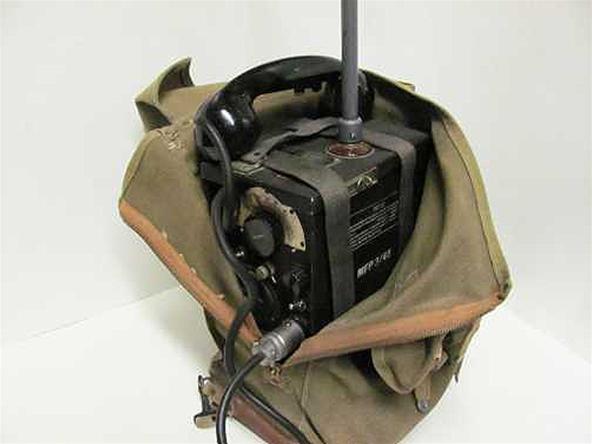
1. SCR-194 (1938)


From Backpack to Smartphone Transceiver: A Visual History of the Mobile Phone

Komunasi tool is 'mbahnya' phones. SCR-194 and SCR-195 is the first portable AM ​​radio in the world. It is created by the U.S. Army Signal Corps Engineering Laboratories at Fort Monmouth, New Jersey. Equipment which is seen as a walkie talkie that first weighs about 11 kg and helpless to reach 8 km.

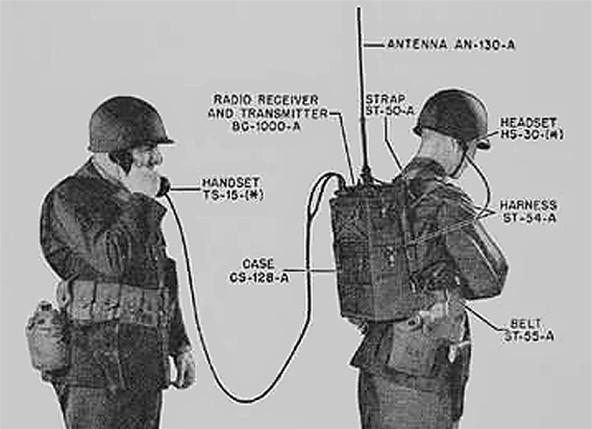
2. SCR-300 (1940)


From Backpack to Smartphone Transceiver: A Visual History of the Mobile Phone

This tool is a replacement for SCR-195. Developed by Motorola, SCR-300 is a portable FM radio used by allied forces in World War II. He weighs between 14-17 kg, with 4.8 km radius coverage.

3. SCR-536 (1942)


From Backpack to Smartphone Transceiver: A Visual History of the Mobile Phone

Motorola produces 'Handie talkies' to the U.S., as the development of two previous communications tool. By using the AM radio technology, SCR-536 is much lighter weight, which is only 2.27 kg with a range of 1.6 km.

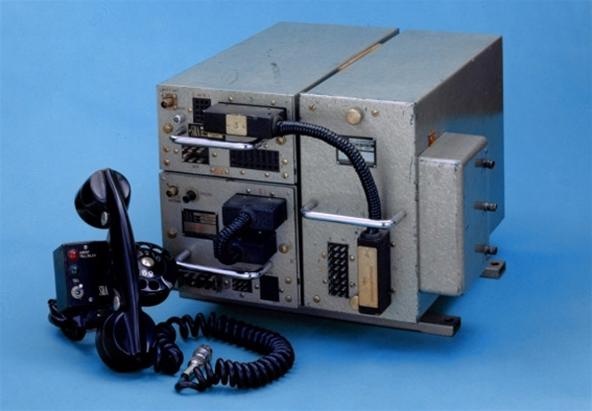
4. MTA (1956)


From Backpack to Smartphone Transceiver: A Visual History of the Mobile Phone

Mobile System A (MTA) is a communication device made by Ericsson and is used by Sweden. He weighs 40 kg or the equivalent weight of 300 units of mobile phones iPhone.

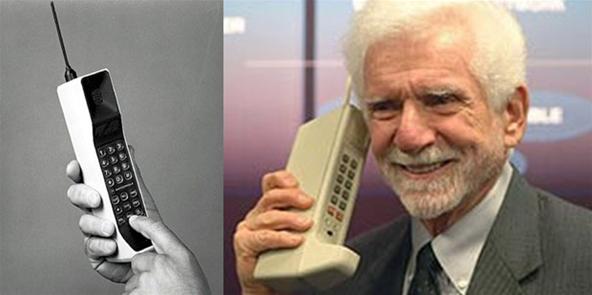
5. DynaTAC (1973)


From Backpack to Smartphone Transceiver: A Visual History of the Mobile Phone

Motorola makes a portable phone prototype Dynamic Adaptive Total Area Coverage (DynaTAC) as the first practical personal cell phone. In the picture, former Vice President of Motorola's Martin Cooper was called competitors of Bell Labs, Joel S. Engel.

6. DynaTAC (1983)


From Backpack to Smartphone Transceiver: A Visual History of the Mobile Phone

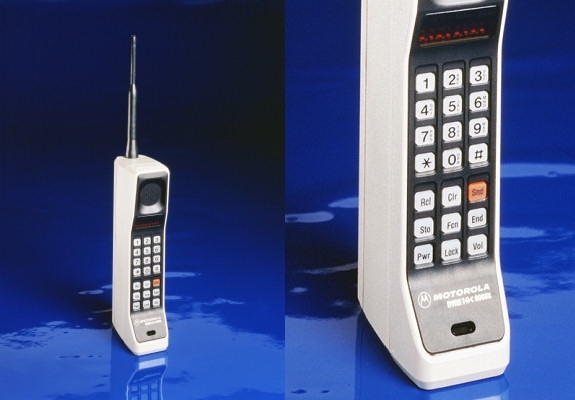
Ten years after the emergence of a prototype DynaTAC, Motorola began marketing this phone to the public. With a weight weighing 0.9 kg, DynaTAC worked in network technology, AMPS, first-generation analog cellular service in North America.

7. MicroTAC (1989)


From Backpack to Smartphone Transceiver: A Visual History of the Mobile Phone

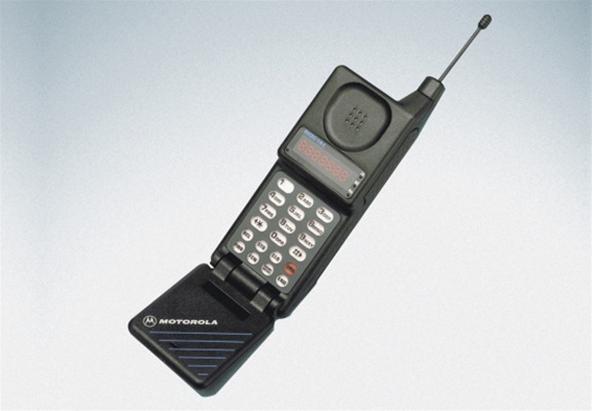
Motorola introduces MicroTAC which is the first flip phone design in the world. This design reduces the size of the phone when not in use. With its small size. MicroTAC is also the world's first cell phone pocket.

8. StarTAC (1996)


From Backpack to Smartphone Transceiver: A Visual History of the Mobile Phone

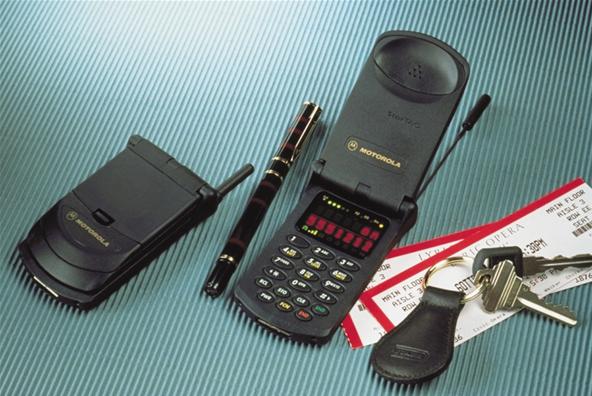
Continuing its line of TAC, Motorola then launched the first clamshell phone named StarTAC that can be folded like a clam shell. According to Motorola, the phone is inspired by a communication device that appears in the movie series Star Trek.

9. Communicator (1997)


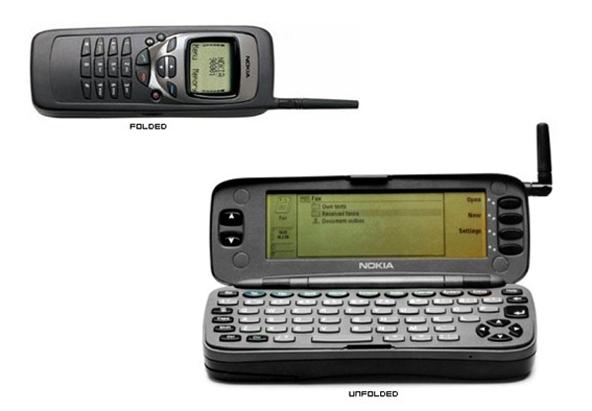
Nokia 9000 Communicator is a mobile phone that brings users into the era of smart phones or smartphones. With its clamshell design, this phone is the first to provide the LCD screen and a full QWERTY key board.

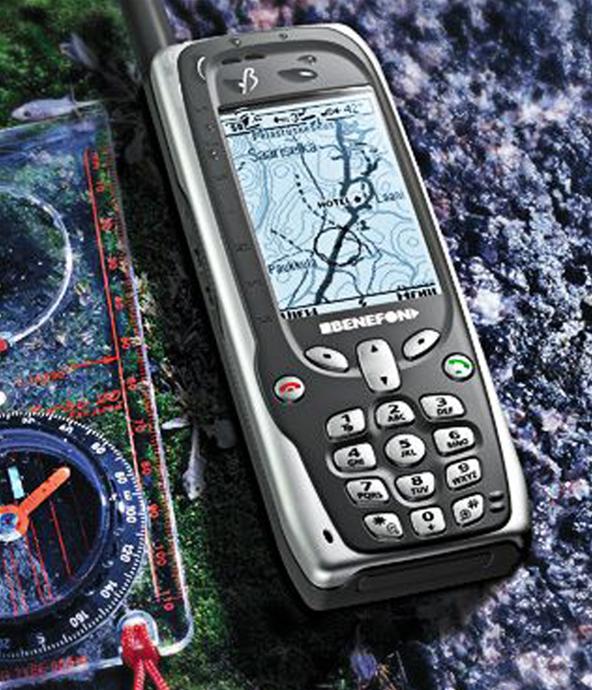
10. Benefon (1999)


Geosentric is the first handset vendor that makes the phone integrated with GPS devices. Not only that, this phone called Benefon withstand splashes of water, using a greyscale, and provides a map to track the position and movement of the user.

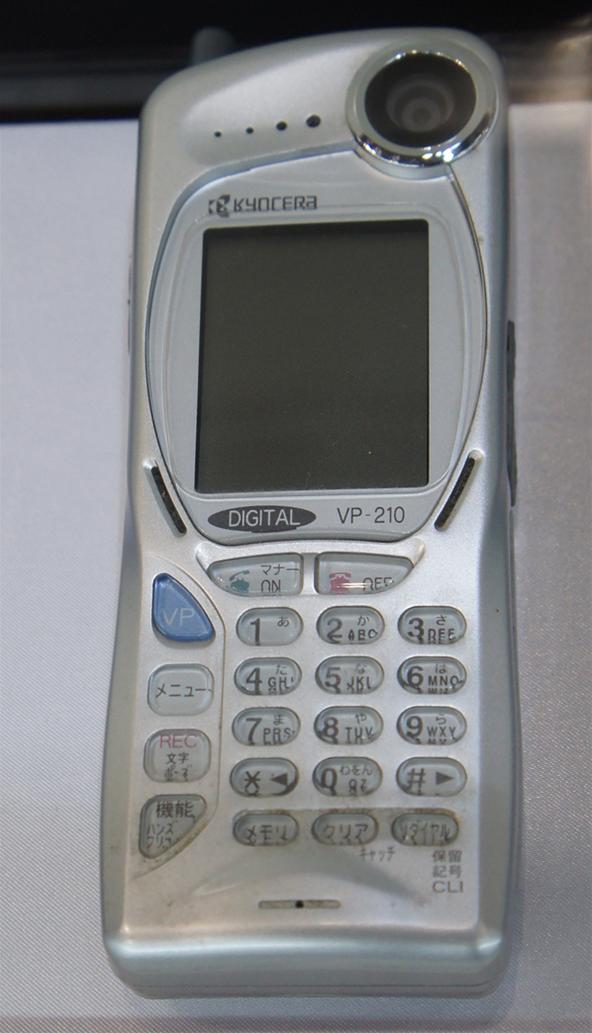
11. VP-201 (1999)


In Japan, Kyocera launched its mobile phone VP-201 which is the first phone that has an integrated camera.

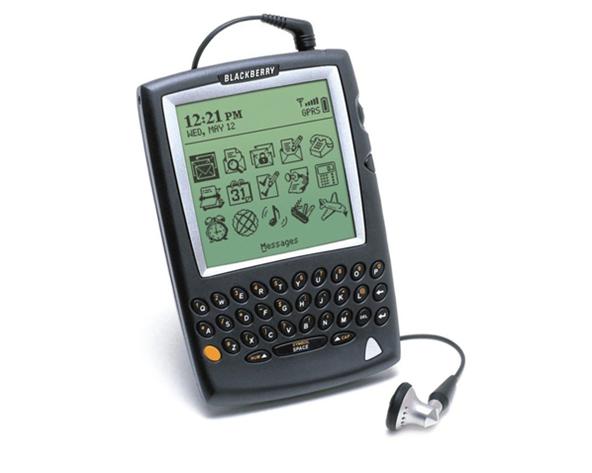
12. BlackBerry 5810 (2002)


RIM launches first BlackBerry devices are integrated with the phone. It is targeting the mobile professional users who require instant email service and schedule adjustments. The disadvantage, these devices do not have a speaker and microphone.

13. iPhone (2007)


Steve Jobs started Apple introduced the iPhone in 2007, a revolutionary smart phone that uses touch screen as well as adopting 3G technology.

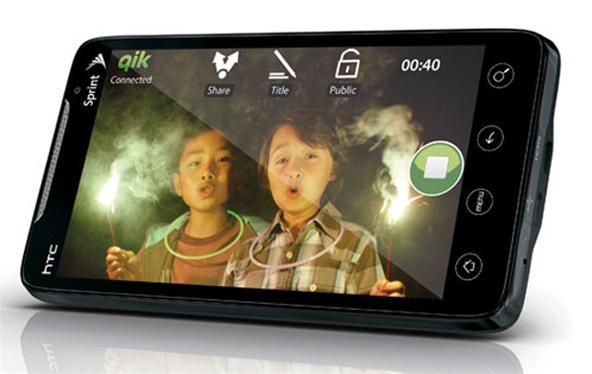
14. HTC EVO 4G (2010)


This phone is a phone first to adopt the standard 4G, and WiMAX networks operating in. With Android operat system 2.1, it is the largest mobile phone touch screen, 8 MP camera, video recorder high definition, HDMI output, features Mobile Hotspot, and Sense HTC interface.

Saturday, May 7, 2011

Ubuntu 11.04 Natty Narwhal Beta Review

Review Last year, Mark Shuttleworth christened Ubuntu 11.04 “Natty Narwhal”, saying the disto would be stylish and create a good, lasting first impression.

While its debut in beta form is smart looking and definitely chases the fashion in operating-system design it’s also the single worst beta release of Ubuntu I’ve ever tested.

That’s not to say there isn’t much to love in Ubuntu 11.04 with the new Unity Interface being the primary news, but even for a beta this release is way too rough. Unity - regardless of what you think of it - isn’t ready for prime time and it seems unlikely Canonical will iron out all its problems before the planned final release in April.

Bugs can be fixed, and there are numerous bugs to fix in this release of Unity, but the larger problem is that Unity, thus far, lacks the functionality of GNOME 2.32. Ubuntu, and its users, would be better served if Unity were not the default desktop for this release.

Unity is a radical departure, but no less so than GNOME 3.0, which has wisely been pushed back until later this year. The problem isn’t that everything you know and love about GNOME is suddenly gone, and Ubuntu 11.04 is, for all intents and purposes a completely different experience than everything that came before it.

The real problem is that Unity can’t do half of what GNOME can do.

If that sounds familiar it might be because the same thing happened to KDE users in the move from KDE 3.x to 4.0. Sadly, rather than learn from the KDE 4 backlash, Canonical has decided to soldier on into the Unity future, whether it’s ready or not. Spoiler alert: it’s not.

On the surface Unity looks good. In fact, Unity will most likely one day trump GNOME in many ways - it’s noticeably snappier than GNOME, works well at just about any screen resolution and even appears to be designed with touch-based devices in mind. Eventually, come Ubuntu 13.04 or so, Unity will seem like a brilliant move, but the transition is going to be bumpy.

The new universal or global menu - which pulls the main menu out of the application window and puts them in the global menu bar - works surprisingly well and is the first of many features that reflect the influence of Apple’s user interface designs. It’s different, but the global menu is probably the easiest change to adjust to - same menus, new location.

Unity’s new launcher/dock is another element that closely mirrors what you’ll find in OS X, though without much of the polish and functionality built-in to Apple’s offering. The dock has some problems and is missing some obvious features, but it’s not hard to see how the dock and accompanying search and launcher tools will eventually be a great time saver.

We have been following Ubuntu 11.04 closely and have thoroughly reviewed Ubuntu Natty Alpha 1, Alpha 2 and Alpha 3 releases. While the first two releases dealt with adding more and more features and functionalities primarily, the latest Ubuntu 11.04 beta release and the one prior to that concentrated on actually bringing in more polish and stability to Unity Shell.

And they are indeed doing a pretty good job IMO. After trying out Ubuntu 11.04 beta for sometime, I decided that I need to do a bit more about it than simply testing it out for the sake of reviewing it. And so I installed Ubuntu 11.04 beta replacing my old reliable workhorse, Ubuntu 10.10 "Maverick Meerkat". I have been using Ubuntu 11.04 Natty Narwhal beta 1 as my primary OS since then.

Ubuntu 11.04 Beta Review, Screenshots
We have been following Ubuntu 11.04 closely and have thoroughly reviewed Ubuntu Natty Alpha 1, Alpha 2 and Alpha 3 releases. While the first two releases dealt with adding more and more features and functionalities primarily, the latest Ubuntu 11.04 beta release and the one prior to that concentrated on actually bringing in more polish and stability to Unity Shell.

And they are indeed doing a pretty good job IMO. After trying out Ubuntu 11.04 beta for sometime, I decided that I need to do a bit more about it than simply testing it out for the sake of reviewing it. And so I installed Ubuntu 11.04 beta replacing my old reliable workhorse, Ubuntu 10.10 "Maverick Meerkat". I have been using Ubuntu 11.04 Natty Narwhal beta 1 as my primary OS since then.


The second screenshot introduces to a new impressive feature. In the Ubuntu installer, there is an option now that lets you upgrade directly from Ubuntu 10.10 to Ubuntu 11.04 using Live CD, a feature I always wished for since it saves a lot of time and bandwidth. A very nifty addition indeed especially because of Ubuntu's 6 month release cycle. Instead of upgrading though, I went on to install it manually completely replacing Ubuntu 10.10.

Essential Keyboard Shortcuts are Now Available
If you are someone who loves to use keyboard shortcuts in Ubuntu, this is probably the first Ubuntu Natty release that has taken YOU into account. Alt+F1 takes you straight into first item in the Unity dock menu and can browse through the dock further using up and down keys.


You must be familiar with the feature shown in the above screenshot already which came into existence during the third alpha release of Ubuntu 11.04. Press and hold the Super key and a whole gamut of keyboard shortcuts are displayed.

Number of Minor UI Improvements
Though there are no big changes in terms UI since Unity itself is *the* biggest change, there are indeed a number a minor UI improvements which brings in a lot of polish and finesse to the Unity interface. Unity has developed a number of rough edges as well in the process.

GNOME Control Center in Ubuntu 11.04

Not only did the developers included GNOME Control Center as a default application, there is now an menu item called System Settings(see the screenshot above) that will take you straight to the GNOME Control Center.


Alt+F2 is also available by default though there is no auto completion of application names or commands yet which makes it rather useless. There are already dock items specifically to search for applications as well as files and folders with dedicated shortcut keys.


CompizConfig Settings Manager(CCSM), so far my biggest disappointment. There are many useful compiz animations that I used to use on a daily basis, like desktop zoom functionality for example, which were missing. So I went on to install CCSM. I was in for a nasty surprise. Whenever you try to enable *any* new Compiz animation, Compiz window manager crashes and restarts. This is a very big problem when you consider the fact that everything about Compiz was buttery smooth in the old GNOME desktop.


Now you can hover your mouse pointer over the volume indicator and change the volume by simply scrolling. That's a nice touch.


Now you can drag n' drop files directly into applications docked in the Unity dock and when you drag a file into it, only supported applications are displayed and every other entry fades away. Another nice touch though it has its share of problems. I was trying to move an image file directly into my home folder, but as you can see only Firefox was 'enabled'.


Ubuntu Software Center keeps on improving. Latest Ubuntu Software Center update adds much needed reviews and ratings support. Now you can rate your favorite applications from within Ubuntu Software Center and can even write quick reviews/comments about them.

Things are Not All Hunky Dory
This is the first beta release of Ubuntu 11.04 and there is not even a month left for the final release to happen. I think its time to scrutinize Ubuntu 11.04 a bit more closely. Here are some of the things that requires immediate attention.

* There is no dock resizing options yet. The current dock is very big for my taste. May be an option to hide dock while not in use is also preferable.

* Compiz is not anywhere near stable, rough edges galore.

* As we have noted earlier, drag-drop of files not working properly.

* As of now, you can't drag-drop applications into Unity dock. You need to open the desired application and choose "keep in launcher" option to achieve the same result. Very unintuitive IMO.

* CompizConfig Settings Manager is an absolute disaster. Installing CCSM used to be among the first things I did after installing Ubuntu, but with the current state of affairs it is not at all recommended.

* Global menu won't work as expected every time.

I like where Ubuntu is going with the new Unity interface. Take dock for example, the number of most frequently used apps for me is around 5 to 6 and listing them in the dock makes it so damn easy and preferable to the old GNOME ways any day. Global menu is awesome and Compiz is way better than the Mutter window manager of GNOME Shell. But a number of minor flaws spoiled the overall experience. But yes, this is not the final product and I just hope that Canonical is able to iron out all the issues prior the the final release.

Source :http://www.techdrivein.com/2011/04/ubuntu-1104-natty-narwhal-beta-review.html

PSN Back up…When?


PSN has been offline since 20 April in the wake of a security breach that saw 77 million account details accessed by a hacker. Obviously it’s really inconvenient and there are lots of people out there who use Sony equipment for entertainment and will be understandably disgruntled about this downtime,” added the consultant.

As things stand the latest update that has come from the PlayStation blog talks about what happens when normal services resume where Debbie Turner of OSM has revealed that there are a few services that will be compensated but asks… It’s a pretty tough question as many gamers will have lost faith because of their credit card details being at risk and already switched over to the Xbox 360. Fingers crossed that that we Westerners have the service resumed soon as many people have been chomping at the bit to play Portal 2 and Mortal Kombat 9 online. Is Sony doing enough for those paying for services?

The heads of Sony held a press conference in which they bowed their heads in shame because of the major PSN compromise. Sony promises to have Playstation Network back up this week!

Unfortunately, Sony lost money on the PlayStation 3 for the first two years, and now they offer multiplayer for free. Anyone remember the big Sony laptop battery debacle? Sure sounds like Sony hasn’t learned their lesson yet.

Imac – More Power - More Stuck

 iMac
The iMac is a range of all-in-one Macintosh desktop computers designed and built by Apple Inc. It has been the primary part of Apple’s consumer desktop offerings since its introduction in 1998, and has evolved through five distinct forms.

In its original form, the iMac G3 had a gum-drop or egg-shaped look, with a CRT monitor, mainly enclosed by a colored, translucent plastic case, which was refreshed early on with a sleeker design notable for its slot-loaded optical drive. The second major revision, the iMac G4, moved the design to a hemispherical base containing all the main components and an LCD monitor on a freely moving arm attached to it. 

The third/fourth major revision, the iMac G5 and the Intel iMac placed all the components immediately behind the display, creating a slim unified design that tilts only up and down on a simple metal base. The current iMac shares the same form as the previous model, but is thinner and uses anodized aluminum and a glass panel over the entire front. In addition it also added a SDXC slot directly under the Slot-Loading SuperDrive. The newest version is available with flash storage instead of a hard drive.

Update
On July 27, 2010, Apple updated its line of iMacs to feature the new Intel Core processors across the line. The 21.5″ models, including the low end 27″ now feature the Core i3 processor but these are upgradable to the Core i5. The high end 27″ features a Quad-Core i5 processor, which is upgradable to a Quad-Core i7. On this date Apple also announced its new “Apple Magic Trackpad” peripheral, a trackpad similar to that of the Macbook Pro for use with the iMac, or any other Apple computer. T

On May 3, 2011, Apple updated its iMac line with the introduction of Intel Thunderbolt technology and Intel Core i5 and i7 Sandy Bridge processors as well as a 1 mega pixel high definition FaceTime camera, features which were first introduced in the MacBook Pro line in February 2011

And Now
the iMac all-in-one with the next-generation processor quad-core processors, powerful new graphics, Thunderbolt innovative high-speed I / O and new technologies FaceTime ® HD camera. Dibanderol halted price of U.S. $ 1,199, the new iMac has a 70 percent faster performance, especially the new graphics capabilities to provide up to three times the performance of previous generations.

“Customers Apple beloved, today we add a new family of iMac that has the technology generation quad-core processor, and graphic quality. Moreover what makes it special is the technology iMac Thunderbolt and completeness FaceTime HD camera,” said Philip Schiller, senior vice president Apple’s Worldwide Product Marketing.
iMac is the first desktop computer on the market to include Thunderbolt breakthrough I / O technology. Developed by Intel with the collaboration of Apple, Thunderbolt possible upgrade ever possible all-in-one computer.

21.5-inch iMac has a single Thunderbolt port, while the 27-inch model has two expansion ports for greater data. Featuring two-lane bi-directional transfer speeds up to a 10Gbps every stunning, Thunderbolt pinned directly to the PCI Express high-performance external peripherals, namely RAID arrays.

new iMac also has supported FireWire device that makes you free cable that meticulous.
Besides being equipped with quad-core Intel Core i5. Apple also provides special services to customers, the freedom to choose an Intel Core i5 Core i7 up to 3.4 GHz. This processor is the next generation features an integrated memory controller responsive to experience extraordinary and powerful new engine medium to high-performance video encoding and decoding. With the new AMD Radeon HD graphics processors, the new iMac has the most powerful graphics ever on the all-in-one desktop.

Continuing commitment to Apple as a leader in green design for the environment. tight iMac meets the Energy Star 5.2 and EPEAT Gold rating achieved.
iMac also features an LED-backlit displays are mercury-free, and made with arsenic-free glass. iMac uses PVC-free components and cables, do not contain brominated flame, using highly recyclable materials and material-efficient features of the system and packaging design.
Every Mac comes on the market, have been equipped with Mac OS ® X Snow Leopard and iLife – Apple’s innovative suite of applications to create and share great photos, movies and music. Snow Leopard build in more than a decade of innovation and includes a Mac App Store ℠ for finding great new application for your Mac.

iLife ’11 features iPhoto ® stunning full screen for browsing, editing and sharing photos, iMovie ® with powerful easy to use tool to convert home videos into fun trailer theater, and GarageBand ® with new ways to improve your play and create great sounding songs.

Pricing & Availability
New IMac is available through the Apple Store (www.apple.com), Apple’s retail stores and Apple Authorized Resellers. 21.5-inch IMac is available in two configurations: one with 2.5 GHz Intel Core, Quad-core AMD Radeon HD 6750M i5 and 500GB hard drive with a suggested retail price of $ 1.199 (U.S.), and one with quad 2.7 GHz Intel Core i5-core, AMD Radeon HD 6770M and 1TB hard drive with a suggested retail price of $ 1,499 (U.S.).

New 27-inch IMac is available in two models: one with 2.7 GHz Intel Core, Quad-core AMD Radeon HD 6770M i5 and 1TB hard drive with a suggested retail price of $ 1.699 (U.S.), and one with 3.1 GHz quad-core Intel Core i5, AMD Radeon HD 6970M and 1TB hard drive with a suggested retail price of $ 1,999 (U.S.).

Twitter Delicious Facebook Digg Stumbleupon Favorites More

 
Design by Free WordPress Themes | Bloggerized by Lasantha - Premium Blogger Themes | cna certification